How to Create a Selfie Video with Your Favorite Celebrity on Kling AI 2.5 (Complete 2025 Guide)
Creating a selfie video with your favorite celebrity used to be a dream limited to meet-and-greet events or expensive collaborations. Thanks to rapid advancements in artificial intelligence, that dream is now closer to reality than ever before. Kling AI 2.5 has introduced powerful generative video capabilities that allow users to create highly realistic, cinematic, and engaging AI-generated videos — including selfie-style videos featuring celebrities.
In this detailed guide, you’ll learn how to create a selfie video with your favorite celebrity using Kling AI 2.5, even if you’re a complete beginner. We’ll cover everything from understanding Kling AI, preparing prompts, best practices, legal considerations, SEO benefits for creators, and frequently asked questions.
Whether you’re a content creator, influencer, marketer, or casual user, this guide will help you get professional-level results.
What Is Kling AI 2.5?
Kling AI 2.5 is an advanced AI video generation platform designed to produce ultra-realistic videos using text prompts and reference images. It leverages cutting-edge diffusion models, motion prediction, facial expression mapping, and cinematic rendering to generate videos that feel lifelike and immersive.
Key Features of Kling AI 2.5
-
High-resolution AI video generation
-
Realistic facial expressions and movements
-
Cinematic camera angles
-
Smooth motion consistency
-
Prompt-based creative control
-
Selfie-style and POV video creation
-
Improved realism compared to earlier versions
Kling AI 2.5 is especially popular for AI celebrity videos, short-form social media content, and creative storytelling.
Why Create a Celebrity Selfie Video Using Kling AI?
AI selfie videos with celebrities are trending across platforms like TikTok, Instagram Reels, YouTube Shorts, and X (Twitter). Here’s why creators love them:
Benefits of AI Celebrity Selfie Videos
-
High engagement rates on social media
-
Perfect for viral short-form content
-
No need for real celebrity access
-
Cost-effective and scalable
-
Ideal for storytelling, parody, and fan content
-
Great for marketing and brand creativity
When done ethically and creatively, these videos can significantly boost your online visibility.
Understanding the Concept of a “Selfie Video” in Kling AI
A selfie video refers to a video that looks like it was recorded by a phone’s front camera. The key elements include:
-
Close-up framing
-
Natural head and hand movement
-
Casual facial expressions
-
Eye contact with the camera
-
Slight camera shake (optional realism)
Kling AI 2.5 excels at replicating these subtle details when prompted correctly.
Important Ethical & Legal Note (Must Read)
Before creating AI celebrity videos, keep these points in mind:
-
Do not claim the video is real
-
Avoid misleading or defamatory content
-
Use for entertainment, parody, or fan art
-
Follow Kling AI’s content policies
-
Avoid commercial misuse without permission
Always label your content as AI-generated when publishing publicly.
Step-by-Step Guide: How to Create a Selfie Video with Your Favorite Celebrity on Kling AI 2.5
Let’s break the entire process into simple, beginner-friendly steps.
Step 1: Access Kling AI 2.5
First, make sure you have access to Kling AI 2.5.
What You Need:
-
A Kling AI account
-
Video generation credits
-
Stable internet connection
-
A clear idea of your video concept
Once logged in, navigate to the Video Generation section.
Step 2: Choose the Video Style (Selfie Mode)
When creating a video, select or describe a selfie-style video.
Recommended Settings:
-
Camera: Front-facing (selfie POV)
-
Framing: Head and shoulders
-
Lighting: Natural or soft indoor light
-
Duration: 5–10 seconds for best results
Shorter clips usually produce more realistic output.
Step 3: Write a Powerful Prompt (Most Important Step)
Your prompt is the heart of the video.
Example Prompt Structure:
“A realistic selfie video of a famous male/female celebrity smiling and talking casually to the camera, filmed in a natural indoor environment, soft lighting, handheld smartphone style, natural facial expressions, cinematic realism, high detail, smooth motion.”
Pro Prompt Tips:
-
Use descriptive but concise language
-
Mention emotions (smiling, relaxed, friendly)
-
Specify environment (room, studio, outdoor café)
-
Avoid overly complex instructions
Step 4: Add a Reference Image (Optional but Powerful)
If Kling AI allows reference images:
-
Use a high-quality, front-facing photo
-
Neutral lighting works best
-
Avoid extreme angles or sunglasses
This helps Kling AI better capture facial structure and expressions.
Step 5: Adjust Advanced Settings in Kling AI 2.5
Fine-tuning settings improves realism.
Recommended Settings:
-
Motion intensity: Medium
-
Facial expression realism: High
-
Camera stability: Slight handheld
-
Background blur: Low
-
Rendering quality: Maximum
Avoid extreme motion settings for selfie videos.
Step 6: Generate the Video
Click Generate and wait for Kling AI to process your request.
Generation time depends on:
-
Video length
-
Quality settings
-
Server load
Once generated, preview the video carefully.
Step 7: Review & Refine the Output
Ask yourself:
-
Does the face look natural?
-
Are expressions smooth?
-
Is eye contact realistic?
-
Does it feel like a real selfie?
If not, tweak your prompt slightly and regenerate.
Step 8: Enhance the Video (Optional)
After generation, you can enhance your video using external tools:
Enhancement Ideas:
-
Add subtitles or captions
-
Slight color correction
-
Add background sound or music
-
Add watermark or “AI Generated” label
Best Prompt Examples for Celebrity Selfie Videos
Here are a few optimized prompt variations:
Friendly Selfie Prompt

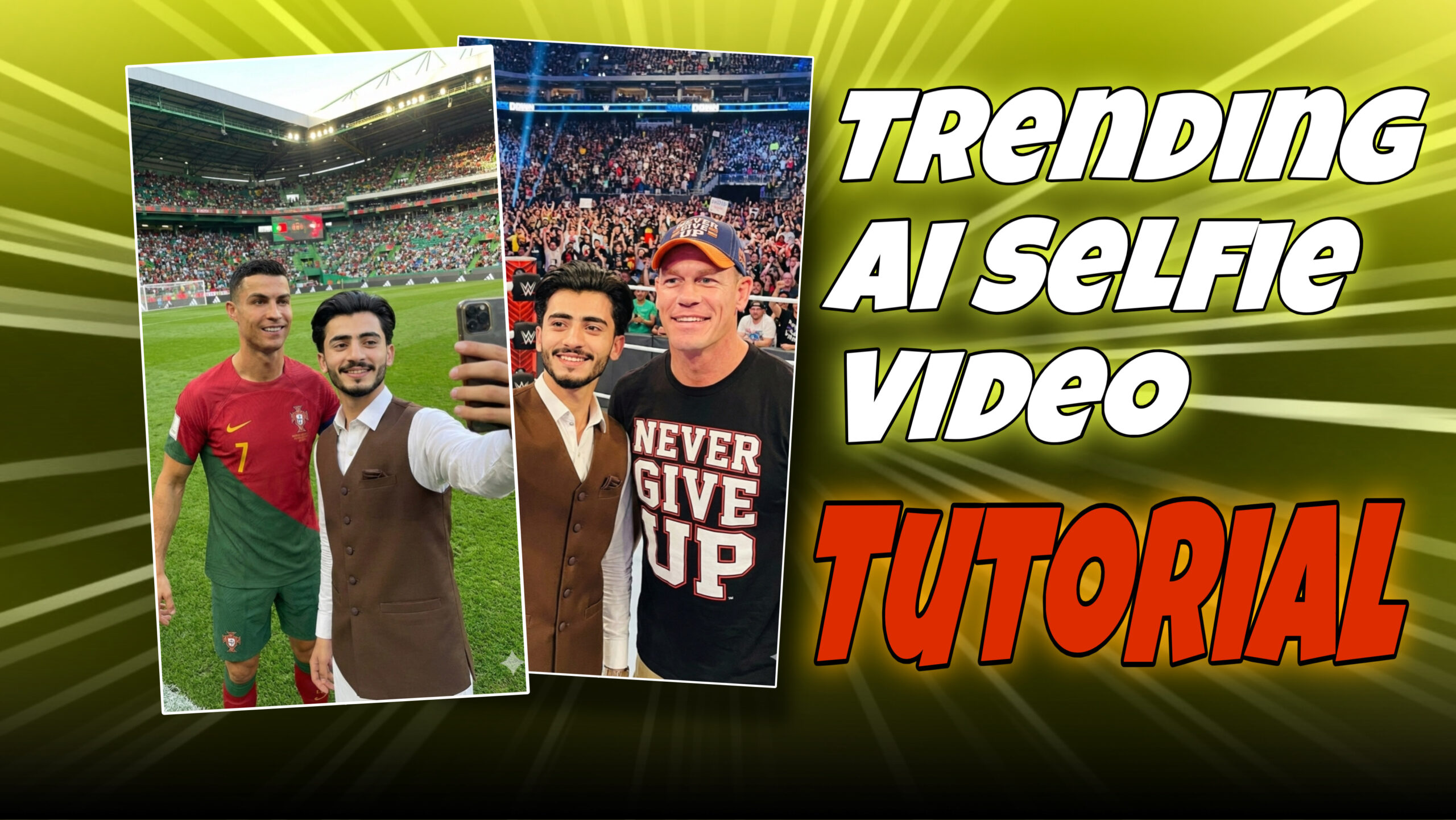
“Photo Selfie with Cristiano Ronaldo in Football stadium playground”
Talking Selfie Prompt

“Photo Selfie with John Cina in wrestling stadium stage”
Generate Selfie
Common Mistakes to Avoid
-
Overloading prompts with too many actions
-
Using low-quality reference images
-
Expecting long dialogues in short clips
-
Using extreme lighting descriptions
-
Ignoring facial expression details
Simplicity + clarity = better results.
How Content Creators Use Celebrity Selfie Videos
Creators use Kling AI selfie videos for:
-
TikTok storytelling
-
YouTube Shorts
-
Instagram Reels
-
AI parody content
-
Fan edits
-
Educational demos
These videos often achieve higher watch time and better engagement.
SEO Benefits of AI Celebrity Videos
If you’re a blogger or YouTuber, AI celebrity content can:
-
Increase click-through rate
-
Improve dwell time
-
Attract trending keyword traffic
-
Boost social shares
Combine AI videos with SEO-optimized blog posts for maximum reach.
FAQs: Creating Selfie Videos with Celebrities on Kling AI 2.5
1. Is Kling AI 2.5 free?
Kling AI usually offers limited free credits, with paid plans for advanced usage.
2. Can I use real celebrity names in prompts?
Yes, but follow platform guidelines and ethical standards.
3. Are Kling AI celebrity videos realistic?
Yes, especially when prompts and settings are optimized.
4. Can I monetize these videos?
Monetization depends on platform rules and local laws. Always disclose AI usage.
5. What video length works best?
5–10 seconds is ideal for selfie-style realism.
6. Can I add voice to the video?
Some users add voiceovers externally using AI voice tools.
7. Does Kling AI support HD output?
Yes, Kling AI 2.5 supports high-resolution video rendering.
8. Are these videos deepfakes?
They are AI-generated simulations, not real recordings. Transparency is essential.
9. Can beginners use Kling AI?
Absolutely. The interface is beginner-friendly.
10. Can I create multiple versions?
Yes, generating variations is recommended for best results.
Prompt for Ai Selfie Video Transition
“Selfie-style video, The camera stays in the same selfie position throughout, The person remains the same and walks to another scene smoothly, It should feel like one continuous shot where the person walks to his front. forward into a new location and ends by taking a selfie in the final scene, no talking, no lip movement, mouth closed”
Generate Video
Future of AI Selfie Videos with Kling AI
With each update, Kling AI is moving closer to:
-
Even more realistic facial motion
-
Better lip-sync accuracy
-
Longer video durations
-
Improved lighting simulation
-
More creative control
AI selfie videos are expected to dominate short-form content in 2025 and beyond.
Final Thoughts
Creating a selfie video with your favorite celebrity using Kling AI 2.5 is no longer a complex or technical process. With the right prompt, settings, and ethical approach, anyone can produce stunning AI-generated videos that feel authentic and engaging.
Whether you’re creating content for fun, social media growth, or educational purposes, Kling AI 2.5 opens the door to a new era of creativity. Focus on realism, transparency, and storytelling — and your AI videos will stand out.